Examples
The repository ships real-world document definitions in the examples/ directory — small enough to read top to bottom, complete enough to render as-is. This page walks through each one and the exact commands to render it.
Setup
All examples render with the CLI (full reference):
pnpm add --global @json-to-office/jto # or @json-to-office/jto-cli for the lean CLI
git clone https://github.com/Wiseair-srl/json-to-office.git
cd json-to-office/examples
Or programmatically — every example is a plain JSON file you can feed to the library API:
import { generateBufferFromJson } from '@json-to-office/json-to-docx';
import { readFileSync, writeFileSync } from 'fs';

const definition = JSON.parse(readFileSync('./invoice.docx.json', 'utf-8'));
writeFileSync('invoice.docx', await generateBufferFromJson(definition));
invoice.docx.json — a branded invoice
A complete professional-services invoice for a fictional studio: section header/footer, a two-column letterhead block, a line-items table, payment instructions, and retainer terms — all on the minimal theme. It is a good first read for how sections, columns, and inline markdown compose:
{
  "name": "section",
  "props": {
    "header": [
      {
        "name": "paragraph",
        "props": { "text": "Northvane Studio — Invoice", "alignment": "right" }
      }
    ],
    "footer": [
      {
        "name": "paragraph",
        "props": {
          "text": "Thank you for your business  |  northvane.studio",
          "alignment": "center"
        }
      }
    ]
  },
  "children": [
    {
      "name": "columns",
      "props": { "columns": 2, "gap": 0.4 },
      "children": [
        { "name": "heading", "props": { "text": "INVOICE", "level": 1 } },
        {
          "name": "paragraph",
          "props": {
            "text": "**#INV-2026-0387**\nDate: April 1, 2026\nDue: April 30, 2026\nTerms: Net 30",
            "alignment": "right"
          }
        }
      ]
    }
  ]
}jto docx generate ./invoice.docx.json -o ./invoice.docxcontract-v1.docx.json / contract-v2.docx.json — tracked-changes diff
Two versions of the same service agreement, made to be diffed. Between v1 and v2 the fee clause changes materially — v1 reads:
{
  "name": "paragraph",
  "props": {
    "text": "The Client shall pay a fee equal to 10% of monthly revenue, invoiced quarterly with payment due within 60 days."
  }
}
while v2 bumps it to 12% of monthly revenue, invoiced monthly with payment due within 30 days, adds one deliverable and expands another in the list, extends the termination notice from 30 to 60 days, and swaps the closing paragraph.
Diff them into a redline:
jto docx diff ./contract-v1.docx.json ./contract-v2.docx.json -o ./redline.docxThe output is a .docx with native Word tracked changes: it opens in review mode, every edit carries an author and timestamp, and anyone can accept or reject changes in Word — no plugin required on the reader's side. Paragraphs, headings, and list items are diffed at the word level; structural changes are replaced and reported in the CLI summary. The same engine is available programmatically as diffDocuments — see the Library API.
visual-infographic.docx.json — the visual component
DOCX is a flow layout, so an absolutely-positioned composition can't be expressed with paragraphs and tables. The visual component authors one as a single PPTX slide on a free canvas, rasterizes it to PNG at build time, and embeds it inline while the rest of the page keeps flowing. This example draws a four-step chevron pipeline:
{
  "name": "visual",
  "props": {
    "alignment": "center",
    "caption": "**Figure 1.** Authored as a pptx slide, embedded as an image.",
    "canvas": {
      "width": 7.2,
      "height": 2.6,
      "background": { "color": "F4F8FF" }
    },
    "elements": [
      {
        "name": "shape",
        "props": {
          "type": "chevron",
          "x": 0.3,
          "y": 0.7,
          "w": 2.0,
          "h": 1.2,
          "fill": { "color": "BBD3FF" }
        }
      },
      {
        "name": "text",
        "props": {
          "text": "Brief",
          "x": 0.4,
          "y": 1.05,
          "w": 1.4,
          "h": 0.5,
          "fontSize": 14,
          "bold": true,
          "color": "0B2E63",
          "align": "center"
        }
      }
    ]
  }
}
The elements are real PPTX slide components (shape, text, and the rest of the PPTX catalog), positioned in inches on the canvas.
jto docx generate ./visual-infographic.docx.json -o ./visual-infographic.docxRasterization requirement
visual components rasterize a PPTX slide to PNG at build time, which needs LibreOffice (soffice) and poppler (pdftoppm) on the host. The jto CLI wires this up automatically when both are installed; otherwise point at a remote rasterizer with the JTO_PPTX_RASTERIZER_URL environment variable (or services.pptx in the library — see Render server). To produce a portable document that needs no service at all, pre-flatten visuals to plain images with flattenVisuals.
language-test.docx.json — proofing languages and noProofWords
Demonstrates Word's spell-check controls: a document-level BCP-47 language, a document-level noProofWords allowlist, and per-component overrides:
{
  "name": "docx",
  "props": {
    "theme": "minimal",
    "language": "en-US",
    "noProofWords": ["Wiseair", "json-to-office", "pptx"]
  },
  "children": [
    {
      "name": "paragraph",
      "props": {
        "text": "Local additions also work: Filaferro stays clean here only.",
        "noProofWords": ["Filaferro"]
      }
    },
    {
      "name": "paragraph",
      "props": {
        "text": "Ce paragraphe est en français et doit être corrigé selon les règles françaises.",
        "language": "fr-FR"
      }
    }
  ]
}
The rendered document spell-checks in US English by default, switches to French rules for the French paragraph (and German for a German heading), never flags the allowlisted brand terms, and excludes a code snippet entirely via noProof: true.
jto docx generate ./language-test.docx.json -o ./language-test.docxBundled templates
Beyond the examples/ directory, more starting points ship inside the packages themselves:
- Playground gallery — run
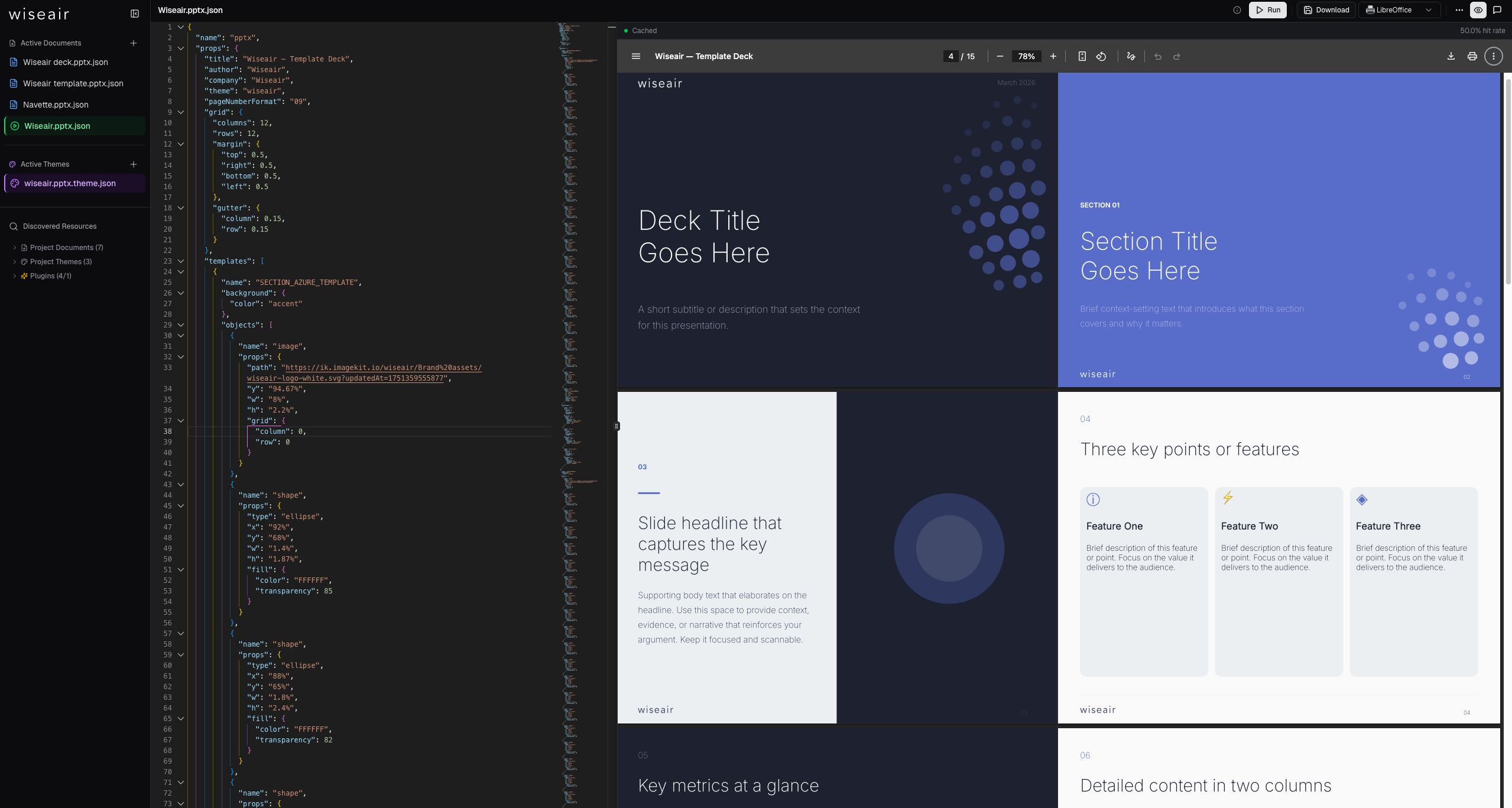
jto docx devorjto pptx dev(or open the hosted playgrounds at docx.json-to-office.com and pptx.json-to-office.com) to browse a template gallery with live preview, including a full 16:9 company deck that exercises the PPTX template and grid system. See Playground. - Bundled DOCX examples —
@json-to-office/core-docxships two complete documents,proposalandtechnical-guide, accessible in code viaexamples,getExample(name), andgetExampleNames().
Related
- Getting started — install and render your first document
- Writing DOCX and Writing PPTX — authoring guides
- CLI reference — every
jtocommand used above